
Menus > Ledger > TRX_Reports > A/R A/P Integrity
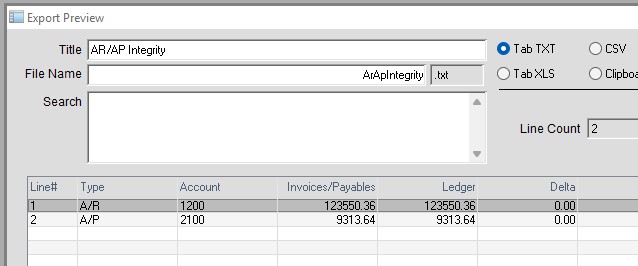
The report analyzes the relationship between source documents and the ledger balance.
For A/R, Accounts Receivable, it totals the amount due on all open invoices and compares that to the current Ledger Account 1200 Balance.
If the Delta is 0.00 they are in perfect balance.
For A/P, Accounts Payable, it totals the amount due on all open payables (bills) and compares that to the current Ledger Account 2100 Balance.
If the Delta is 0.00 they are in perfect balance.
If A/R is not in balance this is for the A/R Fix:
(A/P Fix is the same principle)
- Run Ledger Detail Diagnostics
Menus > Maintenance
DiagSQL > Diag Window
Click the Blue button “Run All Ledger Detail Diagnostics” (upper right corner)
If there are errors, fix them all and run Diagnostics again until clean.
Run the A/R Integrity report again.
If the Diagnostic fixes did not fix the Integrity report, go to step 2.
– - The recommend fix is to make a General Journal entry to bring the ledger account into balance with the source documents.
Determine the Ledger Period Opening Date
The error is most likely in a closed period.
You have the option of reopening periods and then running diagnostics as above to see if it will show up.
You can re-open more than 1 month at a time.
Errors may be buried back many years so in most cases it is not worth tracing more than 1 year ago.
Open as far back as you want, then check Transaction Diagnostics again.
If diagnostics are clean and there is still the Integrity error, go to step 3.
– - Note the Ledger Opening Date (do not close periods after step 2).
Determine whether the Ledger Balance needs to go up or down.
For A/R if the Transactions are less than the Invoices the the GL Entry for 1200 will be a Debit (DR).
In this case the Delta show as a + Amount, If negative the AR entry will be a Credit (CR)
–
Menus > Ledger
Ledger > General Journal Entry
Insert a Transaction:
Transaction Date: Today
Post Date: First day of the Ledger Opening Date
Description: A/R Integrity
Account SUSPENSE (3900 often)
Debit Amount from the Delta on the Integrity Report
(Or Credit Amount if the A/R Transactions are More than the Invoices)
Tab to line 2
Account OWNERS CAPITAL (3100 often)
Debit or Credit Amount in the opposite column than line 1.
Note that OWNERS CAPITAL is not a required account.
You can use any account that is appropriate to your accounting standards.
Click OK to save the entry.
– - Open the Transaction Inspector (lower left corner of General Journal window)
Double click the Transaction for the Suspense Account
Edit the Account Number (in the blue box) to 1200 (Receivables).
Clock OK to save the entry.
– - Confirm Entry:
TRX Reports > A/R A/P Integrity
Delta on A/R should show 0.00
– - Ledger > Close Periods
Close at least 1 month.
Leaving a month open after the above entry will generate another error.
If you follow generally accepted accounting principles this error should NOT show up again.
Inserted by AG on 09-09-2026, Edited 10-12-2026