
When we release an upgrade it often includes a procedure to update the database on the server as well as the local library.
If any fields are added to the database in the release it has to do this.
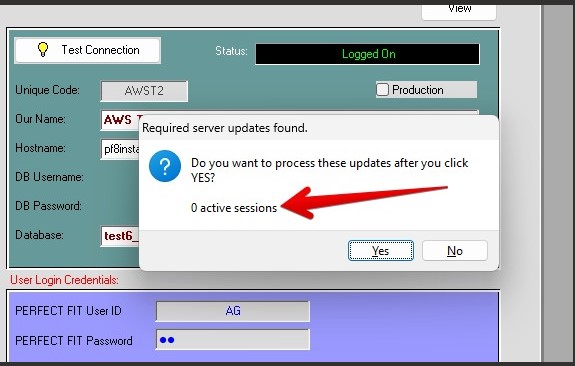
When a user is the first to sign on with a new version, or even a pre-release, if there are updates to be done they will get this message.
Required Server updates found.
The active sessions part of the message shows if other users are logged on.
If there are more than 3 active sessions (and maybe that should be 0 to be safe) the user should answer No, do not process the updates.
Updating the server causes locks on certain tables which can cause existing users to get locked, and no work can be done.
Therefore, to do an efficient upgrade, all users must log off and STAY OFF during the upgrade process.
See Maintenance > Utilities > Active Connections
This shows who is logged on, and they can be forced off (terminated), but that does not prevent them from logging on again.
When the upgrade is run after clicking Yes when there are 0 sessions, if often takes a minute or a few minutes.
After the next OK message, the users can get back on again using their existing version or the new version.
If the user answers no, it will still log on and many features will continue to work.
That way you can see under Active Connections who is still logged on.
Inserted 09/11/2025-HS