
Reminders can be inserted which will open on the designated date to remind the user of an action to be taken.
The Reminders list opens when logging on, but will not open if there are no reminders for the user.
The Reminders List window can also be opened under MenusSQL > Reminders
Keyboard shortcut is Ctrl-M or Cmd-M
Reminders window:
Customer Window > Notes
Reminders are also supported on the Vendor’s window, Sale Rep Window, and the Inventory window
On the Inventory window go to Other Data > Development/Specs
Click the Insert button and enter the desired reminder.
Field labels should be clear.
If a Reminder date is entered and there is no For (ID), all users will see the reminder when logging on.
Using the window:
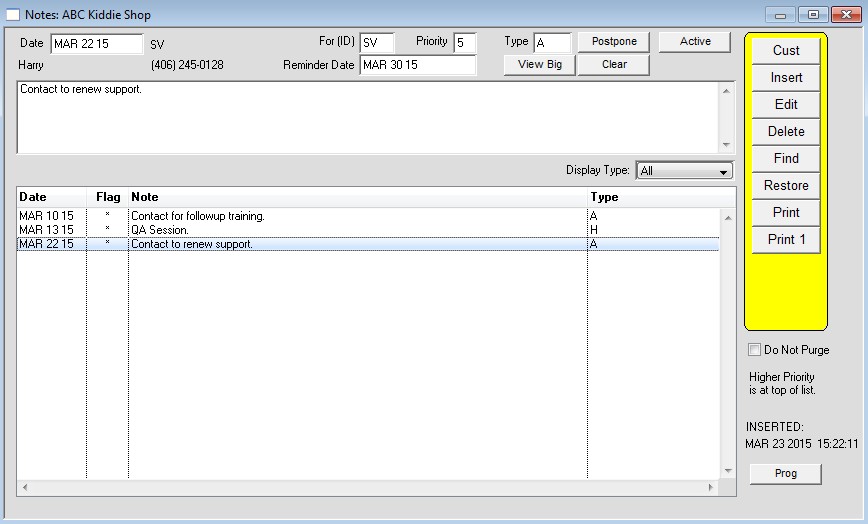
Double click a line to view the details in a larger window (or highlight the line and press the “view big” button).
The date column on the left is the date the reminder was inserted. The Reminder Date field at the top show the date the reminder is set to notify
the user.
The Postpone button is used to move the reminder further out by one day.
The Note Priority field can be used to assign levels of importance to each reminder.
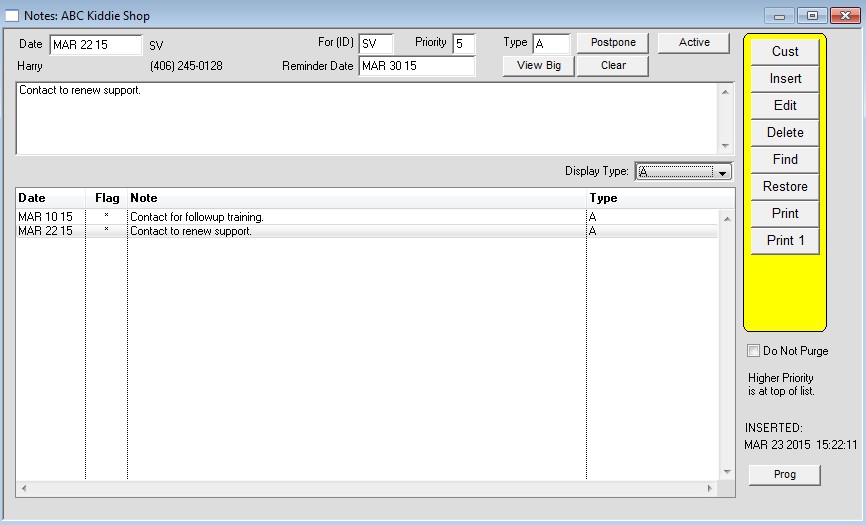
The Type field can used group reminders together and sort them. See the second screenshot to see the “A” type reminders displayed.
Use the Active button to swap between viewing just the line that match the Display Type, and all Notes.
Screenshot 1
Screenshot 2
Revised 06/24/2026 – AG