
This feature is used for entering Purchase orders for Embellishments such as over-dyeing, silk screening, or embroidery on finished goods.
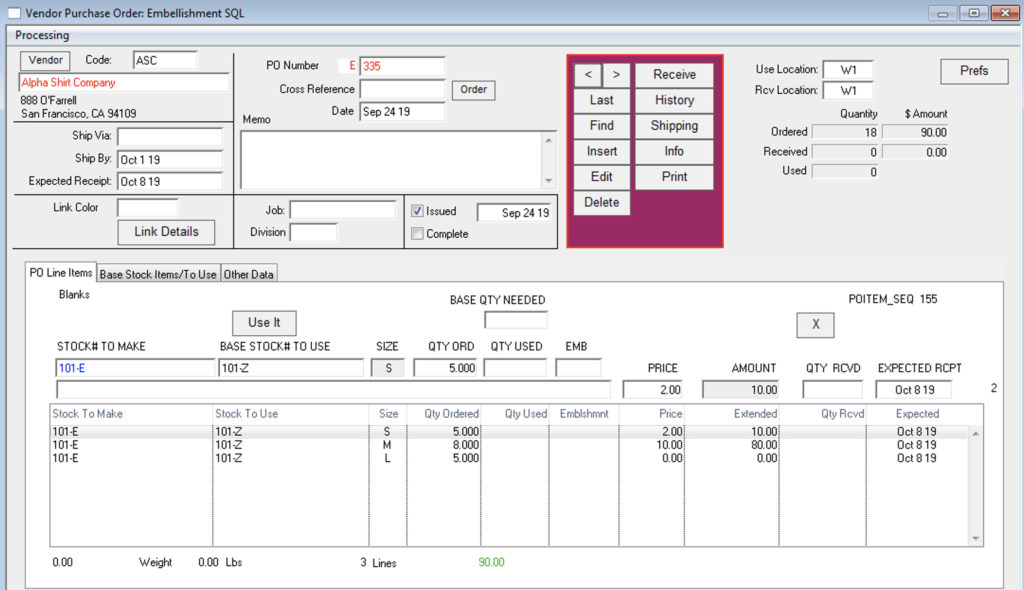
Menus > Purchase Orders > Embellishment
Click Insert
Enter Vendor code
Enter Stock # to use
Basic, unembellished garment: “blank” or “prepared for dye”
Enter the price of embellishment, that is the cost per unit to be paid to the contractor.
Enter Stock # to receive
Finished garment, with embellishment
To receive goods:
Click on “Receive”
Enter a quantity for each size.
If received complete, click the “All” box. (This will show on the first page of the PO, and keep these items off of the “Not Received” and WIP reports)
Click OK
*This is a shortcut to the Style Master Window:
From the Purchase Order Window:
Double-click to go to Stock # To Use the inventory window.
Double-click while holding down the Command/Control key to go to Stock # To Receive inventory window.
Revised 10/22/2019 – SV