
Cut Tickets: Parts Used Button opens the “Part Used for Cut Ticket # –” window.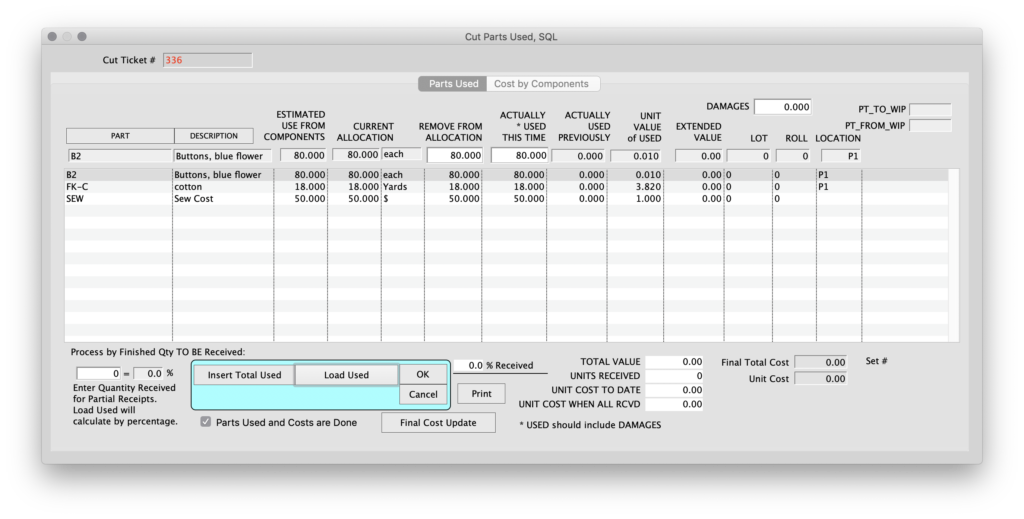
This window allows you to adjust allocations and enter raw material usage.
You do not have to receive an entire cut ticket to adjust Parts Used.
This window will calculate the percentage of the total units received to date.
Insert Total Used button
Allows you to remove Allocations and insert quantities Actually Used for this cut ticket. Enter a positive number in Remove from Allocation.
Click on the Load Used button to enter all allocations as Actually Used This Time. If you have only received part of the cut ticket, enter the quantity received in the box in the lower left part of window. The Load Used button will now enter this percentage of allocations as Actually Used.
Tracking partially completed Cut Tickets is much more complex than waiting until the Cut is Complete.
Cut Tickets > Reports > Allocations/Used
Select the tabframe for Parts Allocations or Parts Used
Shows Number of Units Received and Average Cost per Unit.
This data comes from the Parts Tracking table.
An alternative for usage analysis would be the Inventory (Parts ) Movements report.
Reports > Movements > Parts
Summary by Part Code, Sort by part Code.
Movement Type = U, Used on Cut
For single Cuts: Cut Ticket > Parts Used > Print
This report has same information as above report, but also shows margin and percent profit, based on the Level 1 Sell Price of the first Style on the Cut Ticket.
Edited by AG, 08-05-2026