
How to Unpost an Invoice
On the Invoice window the Post button turns gray and its name changes to Posted after the invoice is posted.
A Posted Invoice has linked transactions and items and many fields cannot be edited.


Generally unposting an invoice requires backend account corrections and is not recommended.
In some cases Unposting might be the best solution for program failure or less so for User error.
WARNING: This procedure can upset the Accounting Department.
You must also be aware that if an invoice has been printed or sent to the client and your unposting is to change it, then you will have 2 documents with the same Invoice Number that do not agree. This is a no-no in the accounting world.
First step is to see if there have been payments on the invoice.
If the Total Amount = the DUE amount you can assume there are no payments>
If the amounts are not equal you have to reverse the payments (or Credits Applied or any other adjustments) before proceeding.
(Separate instructions)
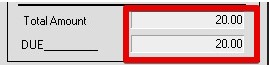
Assuming there are no payments:
- Zero out all linked Transactions
Use Trx Inspector button
For each Transaction SET, click the Zero Set button
(Programmer’s access required)
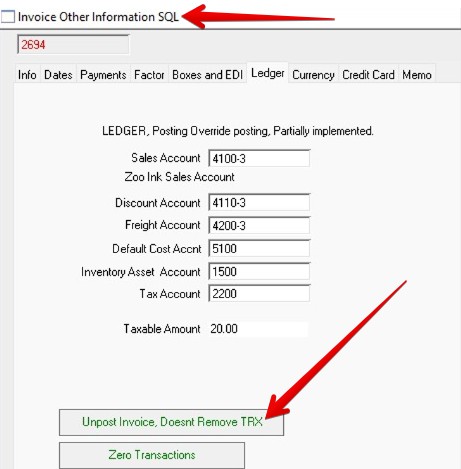
- Invoice window > Other Info button > Ledger tabframe
Button Unpost Invoice (Doesn’t remove TRX)
(Programmer’s access required)
Updates the Post field only, INPOST_SALES
Revised by AG, 05-23-2026