
This wiki will show you how to run a report, using a custom search, showing only Orders that have the “On Hold” checkbox
marked in the Info window.
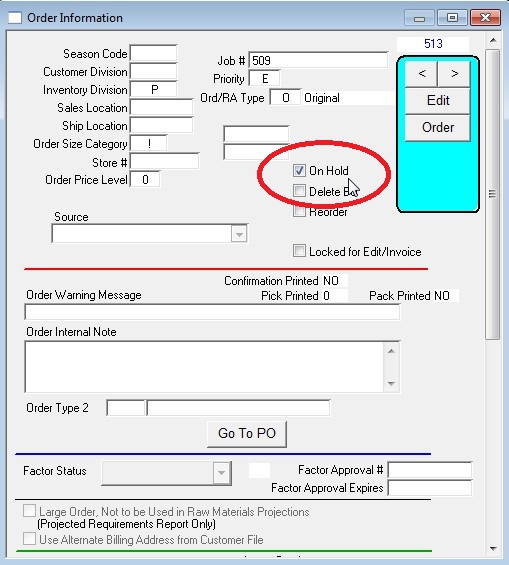
Go to Menus > Orders From Customers
Reports > Customer Orders
Select the desired report format and sort type on the left, on the right place a check in at least one of the checkboxes at the top of the
screen (Original Orders, Back Orders, Return Authorizations), then select “Custom Search” and press OK, then choose your report destination
when prompted.
Note: If your version of Perfect Fit 7 is prior to Nov 1 2011, you will see an “Available Search Classes” window at this point. Press the “Modify” button.
Use the info from the following screen shot to create your custom search:
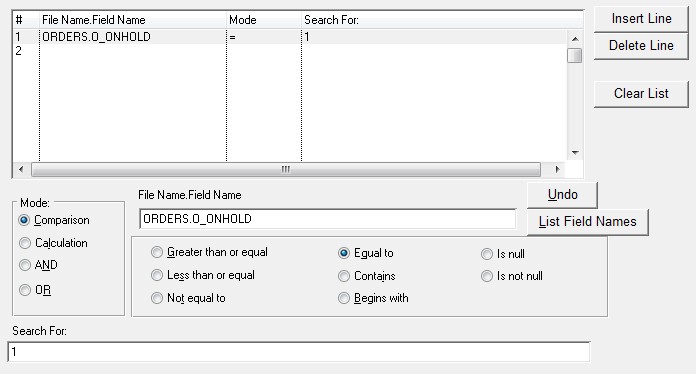
When finished press “Ok/Use Search” (if using a version prior Nov 1 2011 you will need to press Accept in the next window) then
select your print destination and press OK.