
Enter old Accounts Receivables
Go to Menus > Maintenance
Utilities > A/R Setup
Click Insert, Enter Invoice Number, Invoice Date, Customer Code, amount Due, and Sales Rep. Many invoices can be entered on this one window, and then processed all together. The Sales Rep field is optional. If you have not paid commissions on these invoices enter the Commissionaire amount also, which is usually the invoice total less shipping charges.
When the OK button is clicked, each invoice will be inserted with a single MISC item for the amount due.
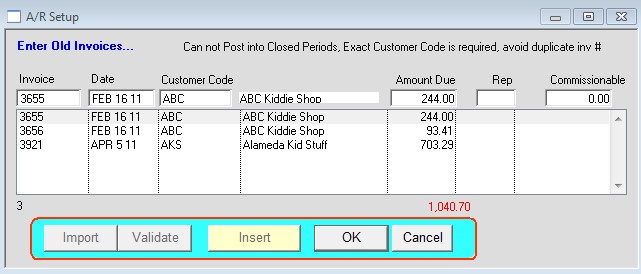
If the Sales Rep assigned to the invoice is blank, the invoice will be assigned to the rep assigned to the customer. The Due Date on the invoice will be the days due from the invoice date based on the customer terms definition.
Last Revision: 5/4/11