
Rebuild Data File.
You must make a Backup of your Datafile before Rebuilding.
The Rebuild must NOT be done over the network. Run the Rebuild on the Server.
*Note: If you do not have PERFECT FIT installed on the server you can copy the data file to your local machine and run the rebuild (see the bottom of this guide for further instruction).
No one else should be in PERFECT FIT during the rebuild. The rebuild will often take an hour or more. It can run unattended, overnight.
Follow these steps to rebuild the datafile:
1) Exit Perfect Fit and make a back up of your datafile
This can be done at the same time as #2.
2) Open the PFShared folder on the server.
Remove datafiles with the word “old” or “new” in the file name.
For example: old_pfdata.df1 or NEW.df1
If there is more than 1 segment with these names, remove them all.
Do not remove segments for PFDATA.
3) Rebuild the datafile
Log into Perfect Fit and go to:
Menus > Maintenance
Rebuild > Full Rebuild
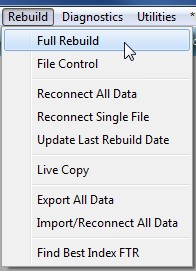
You must answer all the questions in order for the rebuild to continue. A new datafile will be created called NEW.df1.
You will know the rebuild has started when you see the working messages “Loading…”.
When the procedure is complete the new data file will be renamed to what your data file was named previously and the old one will be renamed Old.df1.
The data file that is named as your previous data file is the rebuilt datafile and is the one that you should continue using.
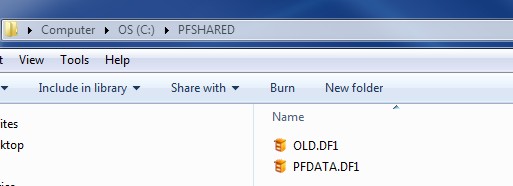 |
| Rebuilt datafile and Old datafile example |
After the Rebuild is complete there is a report to print that shows the number of records in each file. Please print this!
If there is a number in the far right column, it indicates that data was lost or found during the rebuild. Data may be lost if there was underlying corruption. Consult with us if you have this situation.
 |
| Rebuild report example |
Print a full diagnostic report and send us the diagnostic report after rebuilding.
If there are problems with the rebuild please call us for instructions, and DO NOT delete the NEW files. We can often use them.
*If you do not have PERFECT FIT installed on the server can copy the data file to your local machine and run the rebuild.
When the rebuild is done copy the rebuilt data file back up to the server.
If you have a multi-segment data file (over 256 Megs), and you decide to rebuild on a local computer, you must copy ALL segments to the same folder on the local computer. Before opening PERFECT FIT, DISCONNECT THE NETWORK. This will prevent the additional segments from being accessed over the network. Failure to disconnect the network can cause serious data corruption. After the rebuild, copy all segments back to the server and DELETE the segments that remained on the local computer.
Revised 4/15/2015 SV