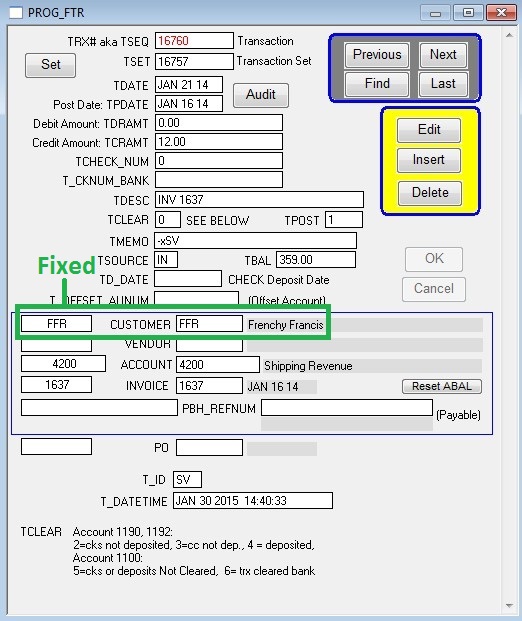
Use the prog window to fix the error.
Use the error on the diagnostic to determine which prog window to access.
For example, in this error:
FTR to CUSTOMERS – SEQ=16760, T_CCODE=, CCODE=FFR
The T_CCODE field is missing a value. You know this because it has an “=” symbol with nothing after it.
Notice how CCODE does have something after it.
The beginning of the error says FTR to Customers. FTR refers to transactions. Transactions appear on invoices.
So you must go to the invoice and insert the missing Customer Code on the transaction.
Go to an invoice then click the TRX Inspector button.
Double click one of the transactions in the right hand window.
Click the Prog button.
Click Edit and enter the Seq number, found in the diag error, into the TSEQ field then press ok.
You will now see the transaction details for the error.
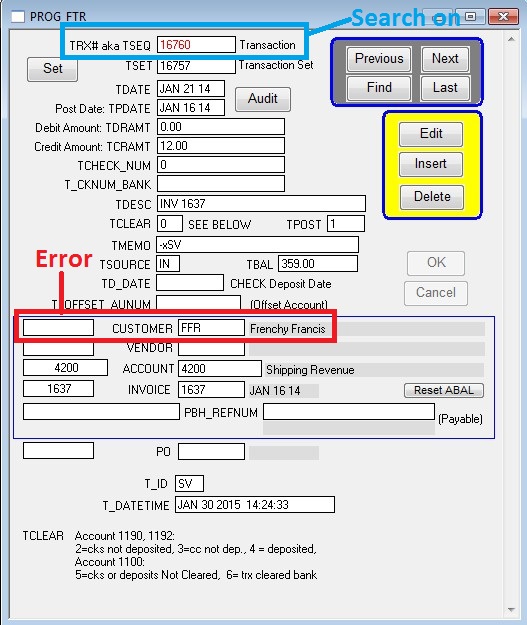
Notice the Customer field is missing a customer code.
Enter the same customer code in both fields then press OK.
The error is now fixed.