
7222: Account Balance is Null
A NULL means the field is not determined. It may appear blank, but it is not a zero. Computer science!
Other users can continue to use PF while this is being fixed.
PART 1:
Run this transaction report:
Maintenance > Diagnostics > Other Accounting > DR or CR is NULL
If this report does not find the transactions, skip to PART 2..
You must EDIT the DR and CR Amounts.
Use the Programmer’s FTR window.
[screen shot missing]
Change them to a number (1 is fine), click OK
Edit again and change them back to 0.00.
Click OK to save.
(2 Edits per Transaction).
PART 2:
Menus > Ledger
Open the Programmer’s Accounts window:
From the Account Categories window, hold the [Ctrl] key on your keyboard and left-click the “Account Number” label:
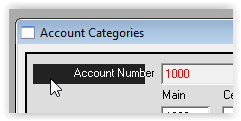
This will open the special programmer’s window.
Click “Find” and search for the “AUNUM” (Account User Number) listed on your diagnostic report.
Click Edit, and enter any number (a 1 is fine) in the ABAL field.
Click OK to save the change.
The entry will overwrite the Null value.

Change the 0’s to Numbers and click OK. Any number – it will be fixed on Reset ABAL.
After fixing the error Reset the ABAL.
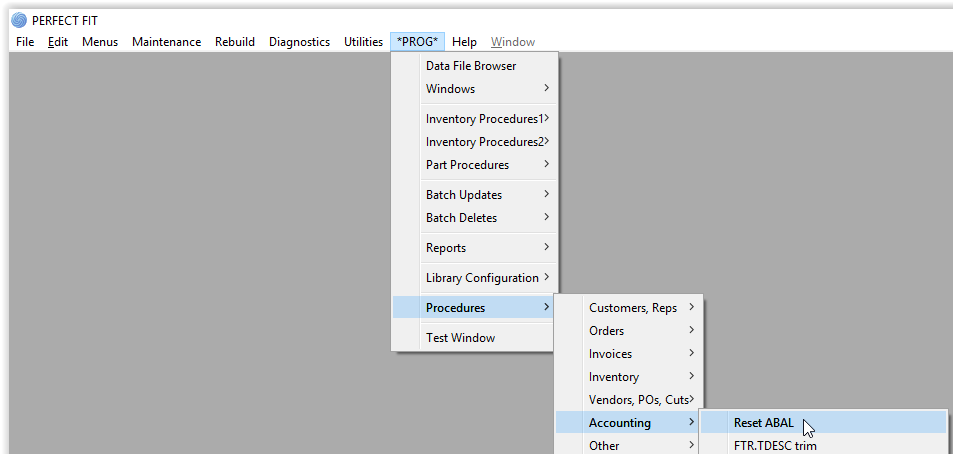
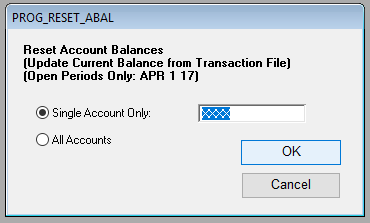
Select “Single Account Only” and do this for each account listed on your diagnostics report.
Doing All accounts takes much longer, but if you have many accounts listed you could opt for this.
Revisions:
8/30/2016 – SV
9/27/2017 – GE
11/14/17 – AG