Customer Window > Categories
The checkboxes are Boolean fields, ie. either Checked or Not Checked or undefined.
If a boolean field is checked, then it is equal to 1.
= 1
If it is not checked, it is not equal to 1.
< > 1
The field names in the customers file are
CUSTCAT_01
CUSTCAT_02
CUSTCAT_03
… etc.
For example, to search on all customers with category 2 checked, set the search as
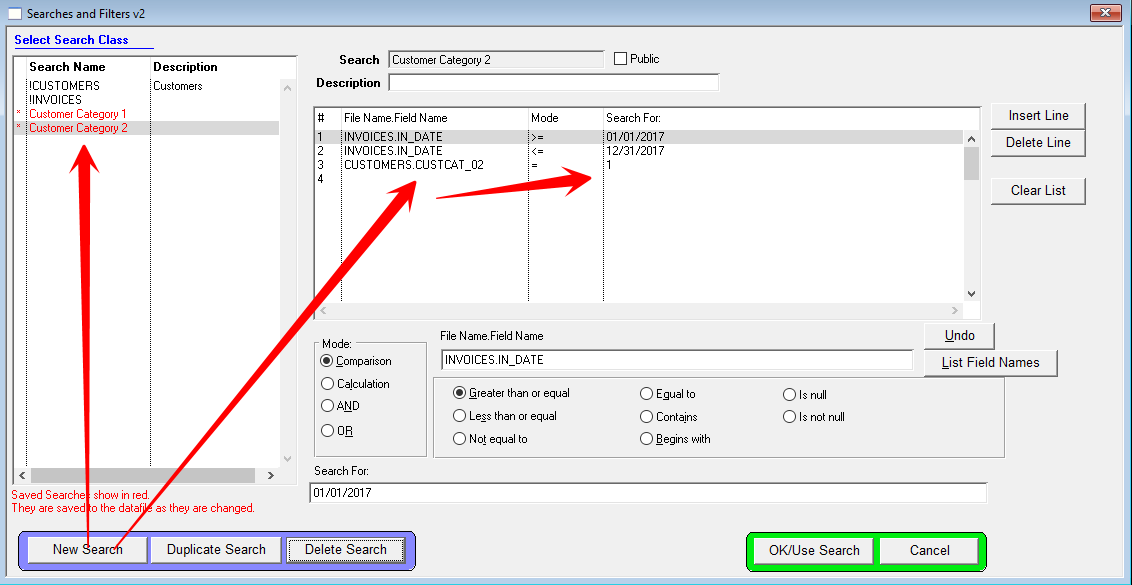
CUSTOMERS.CUSTCAT_02 = 1
to search on all customers with category 3 NOT checked, set the search as
CUSTOMERS.CUSTCAT_03 <> 1
Note that you DO NOT search on the label applied to that field.
If you want to find customers where the first AND second checkboxes are checked:
CUSTOMERS.CUSTCAT_01 = 1
CUSTOMERS.CUSTCAT_02 = 2
If you want to find customers where the first OR second checkboxes are checked:
CUSTOMERS.CUSTCAT_01 = 1
OR
CUSTOMERS.CUSTCAT_02 = 2
The rule here is that if the field names are different, there is an implied AND between the 2 lines, therefore the OR must be explicitly stated.
Sample screenshot of a CUSTOM SEARCH with a date range and category 2: