
PERFECT FIT can be set to automatically calculate sales reps commissions when different inventory items are commissionable at different rates. This can be done on a Rep by Rep basis.
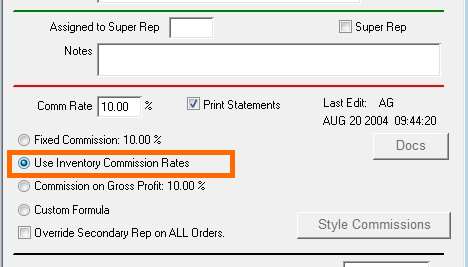
1. Go to Menus > Reps/Commissions. For each Rep that will use this feature, Edit the Rep and click the “Use Inventory Commission Rates” button.
2. Go to Menus > Inventory. On the Style Master Window, go to Other Data > Notes. For each inventory item that will be sold by the above marked sales reps, Edit the item and enter the field “Commission Rate for Line Item Commissions”.

3. When Invoice Insert is OK’d, the total commission is calculated. The commissionable amount will be the total commission due the rep, and the Rate will be 100%. These numbers can be edited before paying the commission.
This technique is not retroactive to invoices that have already been inserted.
Revised – 7/7/2016 – SV