
If the check number needs to be changed on the same day as it was entered:
Transactions > Void Check
Menus > Checks/Payables
Transactions > Re-Use Check Number
This will move the voided check to the lowest number in the system
Insert the check again with the correct number.
Change an older check number:
Find the check with the incorrect number.
Click the Trx Inspect button.
This opens the Transaction Inspector showing the set for this transaction.

Double click on the first Transaction line.
The Transaction Details window will open.
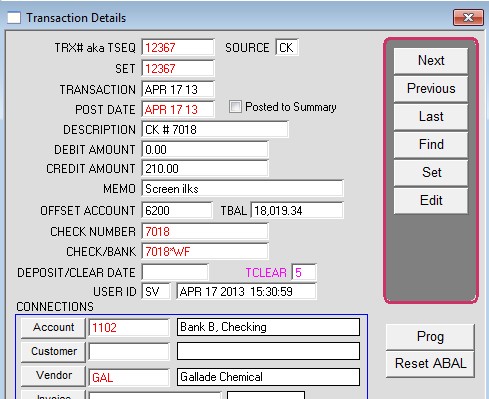
Click Edit
Change these fields to show the correct check number
DESCRIPTION
CHECK NUMBER
CHECK/BANK (Warning: Do no change the asterisk and the bank code after the asterisk)
Repeat this edit for every transaction that is displayed on the Transaction Inspector.
You can reopen the Transaction Inspector by clicking the Set button on the detail window.
*Payroll checks – In addition to changing check numbers, for payroll checks you must also change the check number in the payroll record.
Go to the Payroll record,
Hold down the control key while clicking employee code.
The prog window will open.
Edit the check number here also.
Click OK to save the changes.
Revised 2/27/13 AG