
Multiple Warehouses override the ship from location on an order.
If this box (order window) has a location only orders with that location will be picked if you specify a location in the pick window.
This process overrides the Ship From location in the order window (next picture).
Order Window (Right Side):
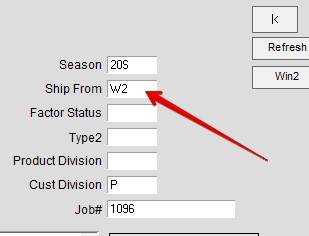
Example:
Some customers maintain two warehouse locations:
W1 for wholesale orders and W2 for web store orders.
If you have an internet order (but no available inventory in that location) that you would still like to ship
this process will ignore the Pick from Location on the order and will pick from your designated warehouse.
To insert a batch of Pick Tickets go to:
Menus > Orders from Customers Pick > ..Batch Insert Picks
This user guide article is for one order, but the same concept applies if you want to do it by
Order Date Range, Order Start Ship Date Range…..etc…. (below blue line left side).
- Enter Location you want to pick from. Location with inventory.
- Enter Location to ignore.
- Click box.
- Once you click the check box “Search Orders with Ship” will grey out.

The above sequence will ignore the Ship From (First Picture above) and pull stock from W1.
Inserted on 10/03/2024 by SH