
If you have entered a Return Authorization or Credit Order, you will need to insert an invoice (Credit Memo) from the RA before applying the credit.
Invoices > Commands > Apply Credits.
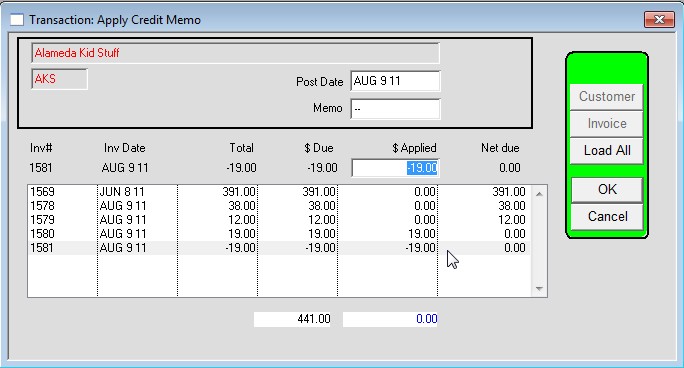
This window will setup the Applied fields automatically, but can be overridden.
The default is setup with the oldest Credit being applied to the oldest invoice.
The user can override the defaults and control which invoices to apply the credits to.
See the Chekbox to turn on or off automatic Credit Application.
This is the default for the window and is specific to each user.
To search on Invoice Number, single click on any line to activate the list search function, then enter the invoice number on your keyboard. The line will jump to that invoice. This is the way it works now so you can try it.
To select an invoice for the credit, double click a line in the list. This will automatically fill out the $Applied with the $Due.
Double click again to remove the $Applied.
Note that the NEGATIVE DUE gets the NEGATIVE applied, and
the POSITIVE DUE gets the POSITIVE applied.
the POSITIVE DUE gets the POSITIVE applied.
The total of the Applied column must be Zero.
No money is changing hands.
This process moves A/R from one document to another.
This transaction has a Source of “OR”, and TDESC (Description) of “CR Applied, [invoice#]”.
Revised 6/23/26 AG