
To create a custom receipt account go to:
Menus > Maintenance
Maintenance > User Lists > Group 2 > Receipt Accounts/Payment Methods
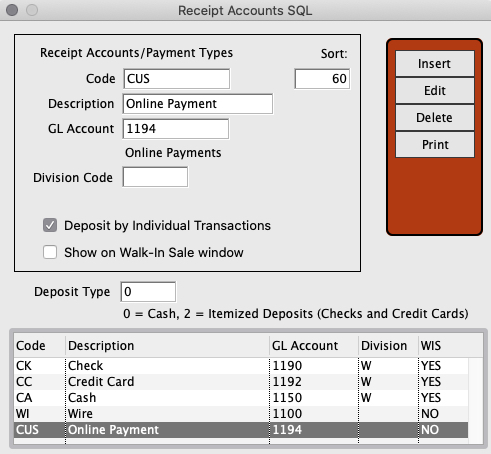
Press Insert and enter a description and GL Account number.
The Division is optional.
You can choose to deposit by individual transactions or not and whether or not this receipt account is available to use on the Walk In Sale window.
Apply a Sort Code to determine what order it will appear in the various dropdown selections. Lower for the top of the list and higher for the bottom of the list.
When done press OK and restart Perfect Fit to enable the new receipt account.
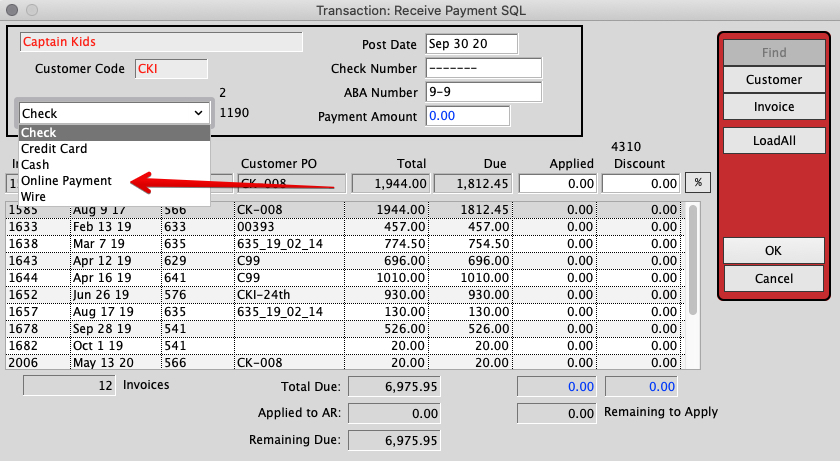
The next time you receive payment you will see the custom receipt account under the account dropdown selections.
Revised on 9/30/20 by SH