
Change a payment from 1 customer to a different customer.
Option 1.
This is appropriate if the payment has not been deposited yet.
Open the Customer window > A/R TRX
Highlight the Check or Credit Card received
(The amount will be in the CR column)
Click the Undo Payment button.
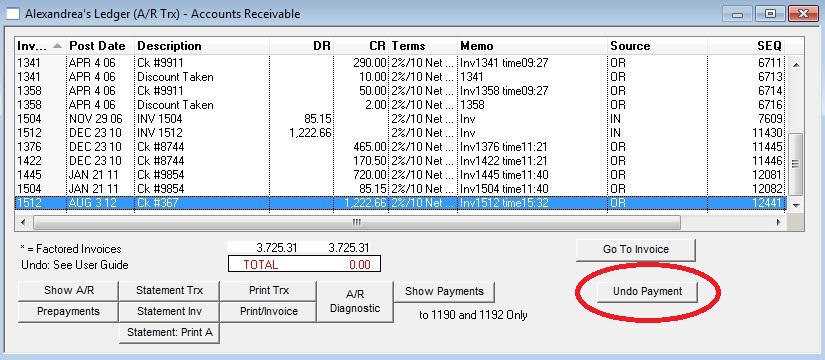
Then receive the payment against the correct customer.
Option 2.
Use a temporary account and the Adjust Receivables command to “move” a payment from one customer to a different customer.
This may be needed if a check received is entered on the wrong customer due to name similarities.
You can use any account as a temporary account. Some users prefer to set up a dedicated account (say 3900) as the temporary account.
Now go to the Customer window and Find the customer you will move the payment FROM. Then go to Commands > Adjust Receivables. Enter “Other Credit” in the Description and use a NEGATIVE amount for the payment, against the correct invoice. Click the “Load All” button if needed. Enter the temporary account number 3900. Click OK.

Next go to the Customer window and Find the customer you will move the payment TO. Then go to Commands > Adjust Receivables again. Enter “Other Credit” in the Description and use a POSITIVE amount for the payment, against the correct invoice. Enter the temporary account number 3900. Click OK.
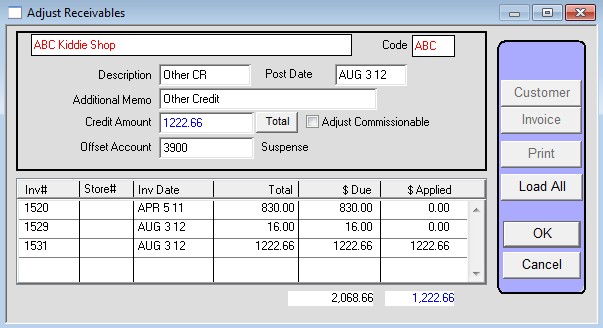
When complete, the balance on the temporary account should be the same as when you started.
The accounting is correct. The only limitation to this technique is that the checks received reports and deposit slips will show the check received from the wrong customer. Customer reports will show the reversing transaction.
Last revised 8/10/11 AG